 Data Scraper
Turn any web page list into a spreadsheet.
Data Scraper finds the list or table on a page, follows the pages for you, and hands you a clean CSV or Excel file. No code, no setup.
Coming soon to the Chrome Web Store.
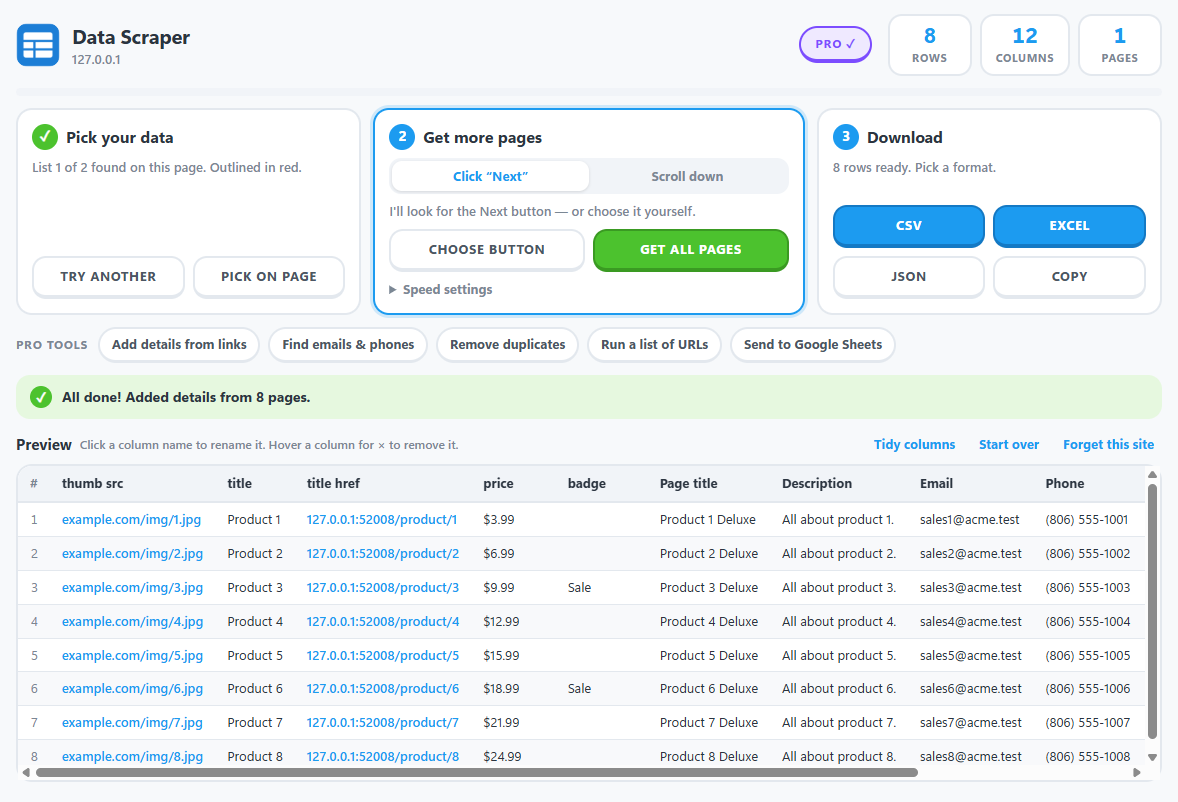
Three steps, start to spreadsheet
1Pick your data
Click the toolbar button. Data Scraper outlines the biggest list on the page. Wrong one? Try another, or click the list you want.
2Get more pages
It finds the Next button and keeps going until the last page. Endless-scroll pages work too.
3Download
Save as CSV, Excel or JSON, or copy and paste straight into a sheet.
What you get
More than just the text
- Links and image addresses come out as their own columns.
- Table headings become column names automatically.
- Rename or remove columns before you download.
- One click tidies away columns that repeat or never change.
Built to be easy
- Plain-language messages tell you what happened and what to do next.
- It remembers your setup for a site, so next time is one click.
- Your data stays in your browser. We never see it.
- Light and dark themes.
Your AI agents can use it too
Data Scraper includes a tool server for Claude, Cursor and other agents that speak the Model Context Protocol.
It runs on your computer, from your IP address
The agent drives a Chrome on your own machine. Pages are never routed through our servers, and the sites you scrape see your normal connection.
find_tables
Lists the tables and lists on a page, with sample rows, so the agent can choose.
scrape_page
Returns a list's rows as structured data, following Next or scrolling for more.
page_details
Reads each linked page for its title, contacts and facts. PRO
Free to use. Pro when you need more.
Free
$0
- Find lists and tables on any page
- Follow Next buttons and endless scroll
- CSV, Excel, JSON and copy
- Rename, remove and tidy columns
- Remembers your setup for 3 websites
- AI agents: one page per request
Pro PRO
$9 a month, or $79 a year
- Add details from links: opens each row's page and adds what's on it
- Find emails and phone numbers into their own columns
- Run a list of URLs in one go
- Remove duplicates, send to Google Sheets
- Remembers every website you set up
- AI agents: multi-page scraping and page details
Pro goes on sale soon. Cancel any time.
Questions
Does my data go to your servers?
No. Everything you collect stays in your browser until you download it. The one thing the extension sends anywhere is a Pro licence key, which goes to our payment provider to confirm it's valid. See the privacy policy.
Which websites does it work on?
Most pages that show a repeating list or a table: directories, search results, product grids, listings. It doesn't read content inside embedded frames, and Chrome doesn't allow any extension to run on its own settings pages or the Chrome Web Store.
Is it OK to scrape a website?
That depends on the site and what you do with the data. Collect only information you're allowed to use, respect each site's terms, and take extra care with personal information.
How do I get help?
Email support@wyntonsoftware.com and include the page you were trying to scrape.